
Introduction: Taking Control of Your Digital Footprint

For most of us, our Google account is the silent engine powering our digital existence. It is the repository for our private correspondence, the vault for our precious memories stored in Photos, and the archive of every query we have ever typed into a search bar. Because these services are so deeply integrated into our daily routines, we often treat our account configurations as “set and forget” entities, rarely stopping to examine the permissions we have granted over the years. However, this convenience comes at a hidden cost: by accepting the default settings, we are often opting into a level of data collection and tracking that prioritizes corporate utility over individual privacy.
The reality is that Google’s default configurations are meticulously engineered for seamless integration across devices, which inherently necessitates a broad reach into your personal data. While this makes switching between your phone, laptop, and tablet feel effortless, it also leaves a wide trail of digital breadcrumbs that could be exploited if left unchecked. When you neglect your account settings, you are essentially leaving the front door to your personal history unlocked. Taking the time to perform a routine audit is not merely an act of technical hygiene; it is a fundamental step in reclaiming ownership of your digital identity in an era where data is the most valuable currency.

Periodic maintenance of your security and privacy settings acts as a vital safeguard against evolving threats and changing platform policies. Many of the most critical privacy-preserving features are buried deep within sub-menus, designed to remain obscure so that users continue to share as much information as possible. By intentionally navigating these sections, you can strip away the unnecessary tracking features that do not actually improve your user experience but do significantly contribute to your online surveillance profile.
True digital security is not a static state, but a dynamic process; it requires the proactive willingness to adjust your defenses as your digital footprint grows and as Google updates its data collection methods.
Ultimately, the goal is to shift your mindset from a passive user to an active manager of your account. By understanding exactly what data is being harvested—and knowing how to switch it off—you create a more secure environment for your personal life. The following sections will guide you through seven specific, often overlooked settings that will help you tighten your security posture, minimize your digital exposure, and ensure that your Google account works for you, rather than the other way around.
Strengthening Account Security and Recovery

Losing access to your Google account is more than a minor inconvenience; it is a digital catastrophe that can sever your connection to professional documents, personal photos, and essential communication channels. While most users remember to add a recovery email or phone number during initial setup, these details often grow stale over time. You should treat your recovery information like a living document, auditing it at least twice a year to ensure that the phone number is current and the secondary email address is one you still actively monitor. Relying on an old, defunct university email or a long-forgotten landline number creates a false sense of security that can leave you permanently locked out during a password reset emergency.
Beyond basic recovery info, the industry standard for account protection has shifted toward more robust methods. While SMS-based two-factor authentication (2FA) is better than nothing, it is increasingly susceptible to “SIM swapping” attacks where hackers intercept your verification codes. To significantly harden your defenses, you should pivot toward physical security keys—small USB or NFC-enabled devices that require a physical presence to authorize a login. These keys provide the highest level of protection against phishing, as they cannot be replicated remotely. If a physical key feels too cumbersome for your daily workflow, consider using the Google Prompt on a trusted mobile device, which serves as a more secure, encrypted alternative to standard text-message codes.

For those times when your hardware key is unavailable or your phone battery dies, Google’s built-in backup codes are your ultimate safety net. These are a set of ten unique, one-time-use passwords that you can print or store in a secure, offline location. Unlike digital codes that can be intercepted, these physical printouts provide a guaranteed way to regain entry into your account even if you lose your primary and secondary authentication methods. Once you have generated these codes, treat them with the same level of caution as you would a physical key to your home; storing them in a fireproof safe or a password-protected digital vault is highly recommended.
The strongest password in the world is effectively useless if your recovery methods are outdated or intercepted. Security is not a one-time configuration; it is a continuous practice of verification and update.
Finally, the most accessible way to audit your current defensive posture is through Google’s native Security Checkup tool. This automated dashboard acts as a personal security consultant, scanning your account for vulnerabilities such as suspicious third-party app permissions, outdated recovery info, and unrecognized devices currently logged into your sessions. By proactively visiting this tool, you can see a consolidated view of your security health and address high-risk items in minutes. Making this checkup a recurring part of your digital hygiene will ensure that your account remains a fortress rather than an open door for unauthorized access.
Managing Data Privacy and Personalized Advertising

Google’s vast ecosystem is fueled by the data you generate daily, meaning the platform’s default settings are strategically designed to monitor your behavior across the web to build a comprehensive digital profile. While personalized advertising aims to show you products that align with your specific interests, this convenience often comes at the steep price of your digital anonymity. By default, Google links your search history, YouTube viewing habits, and even your physical movements to your account to refine its ad targeting algorithms. If you are uncomfortable with this constant surveillance, you can strip back these tracking mechanisms by navigating to the My Ad Center dashboard, which serves as the command center for your advertising preferences.
To truly reclaim your privacy, you must address the core tracking services: Web & App Activity and Location History (now rebranded as Timeline). When these features are enabled, Google continuously logs every query you type, every map route you navigate, and every app you open on your Android device. Disabling these options prevents Google from associating new activity with your profile, effectively stopping the growth of your data footprint. You can manage these settings by visiting the “Data & Privacy” section of your Google Account. It is important to remember that turning these off involves a distinct trade-off; for instance, disabling Location History will stop Google Maps from providing personalized recommendations based on your past visits, while turning off Web & App Activity may make your search results feel less intuitive and localized.
To achieve a balance between utility and privacy, consider setting your account to automatically delete data after a specific timeframe—such as three or eighteen months—rather than disabling the features entirely.
For those who prefer a more surgical approach, the “Data & Privacy” dashboard allows you to purge historical data in bulk. You can choose to delete specific chunks of activity from “the beginning of time” or set up Auto-delete controls for your location and search history. By proactively pruning this information, you strip away the historical context that Google uses to predict your future behavior. Ultimately, taking these steps transforms your Google account from an intrusive data-gathering machine into a more neutral service, allowing you to enjoy the benefits of Google’s tools without feeling like your every digital step is being recorded for an advertiser’s benefit.
Controlling Public Visibility and Profile Sharing

Your Google account often holds a wealth of personal information, much of which can be inadvertently shared with a wider audience than you might realize. From your contact details to your birth date, various pieces of your digital identity might be visible to third parties, or even the general public, if not configured carefully. This unintended exposure poses a significant risk for data scraping, targeted advertising, and even more serious identity data gathering, making it crucial to understand and proactively manage your public profile settings. Taking control of these settings is a fundamental step in establishing robust digital boundaries and protecting your privacy in an increasingly interconnected online world.
Navigating Your Google ‘About Me’ Section
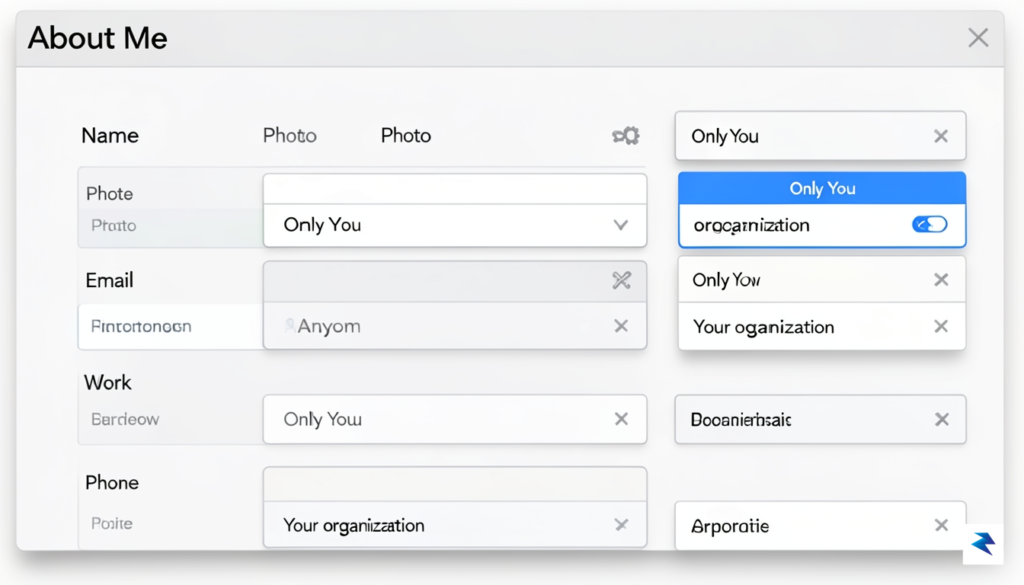
To begin securing your public visibility, your first stop should be the ‘About Me’ section of your Google Account. This centralized hub displays the personal information Google has stored about you, and more importantly, allows you to dictate who can see it. You can access this critical privacy control by heading to your Google Account dashboard, typically found by clicking your profile picture in any Google service and selecting “Manage your Google Account.” From there, navigate to the “Personal info” tab on the left sidebar, and then click on “Go to About Me” towards the bottom of the page. This portal is where you’ll review every piece of information Google might be sharing about you, offering a granular level of control over your public footprint.
Deciphering Visibility Settings: ‘Only You’ vs. ‘Anyone’
Once inside the ‘About Me’ section, you’ll notice that each piece of information — be it your name, birthday, gender, or contact details — has a corresponding visibility setting. The two primary options you’ll encounter are “Only You” and “Anyone,” though some may also see “Your organization” if associated with a work or school account. Selecting “Anyone” means that the particular piece of data is publicly available to anyone on the internet, which can be easily indexed by search engines or collected by automated scraping tools. Conversely, choosing “Only You” ensures that this information remains strictly private, visible only to you when logged into your Google Account. It’s imperative to scrutinize each item and default to “Only You” for anything you consider even remotely sensitive, rather than leaving it to chance.
Safeguarding Specific Profile Data
Many users are surprised to discover that sensitive data like their phone number, birth date, or even their gender might be set to “Anyone” by default or through past oversights. To change these settings, simply click on the specific information field you wish to adjust, such as “Phone” or “Birthday.” A small dropdown menu or toggle will appear, allowing you to select your preferred visibility option. For example, ensuring your birthday is set to “Only You” prevents unwanted parties from gathering data that could be used for identity verification or targeted scams. Similarly, hiding your phone number shields you from unsolicited calls or texts and reduces the risk of it being added to public databases. Regularly reviewing and updating these individual data points, including your work history, education, and even the “Sites you’ve created” section, is a crucial ongoing privacy practice.
Ultimately, proactively managing your Google profile’s public visibility is not a one-time task but an ongoing commitment. By routinely checking your ‘About Me’ settings and ensuring that sensitive information is set to “Only You,” you significantly reduce your exposure to data exploitation and maintain stronger control over your personal privacy online. This diligent approach helps you maintain boundaries, prevent unwanted data gathering, and ensure your digital identity reflects only what you intentionally choose to share.
Auditing Third-Party Access and Connected Apps

The “Sign in with Google” feature is a staple of modern web browsing, offering a seamless way to bypass tedious registration forms. However, this convenience often comes at a hidden cost to your digital security. Every time you authorize an application to access your Google account, you are effectively building a bridge between your private data and that developer’s infrastructure. Over the years, many of us have granted these permissions to dozens of services—ranging from productivity tools to casual mobile games—that we no longer remember or use. These “zombie” connections remain active long after you have abandoned the app, creating an unnecessary pathway for potential bad actors to gain insight into your personal information, contacts, or emails.
Reducing your digital attack surface requires regular housekeeping of your account permissions. If a developer’s server is ever compromised, any lingering authorization token linked to your Google account could potentially be exploited to access your data, even if you stopped using the service years ago. By revoking access to legacy applications, you minimize the number of entry points available to hackers and ensure that only the services you currently trust and utilize have the keys to your digital kingdom.
How to Audit and Revoke Third-Party Access
Performing a security audit of your connected apps is a straightforward process that takes only a few minutes but yields significant security benefits. To begin, navigate to the Security section of your Google Account dashboard and locate the panel labeled “Your connections to third-party apps and services.” Clicking on “See all connections” will display a comprehensive list of every application currently authorized to access your data.
- Review the list carefully, looking for apps that you do not recognize or no longer use regularly.
- Click on a specific entry to see exactly what permissions were granted, such as access to your Google Drive files, calendar events, or basic profile information.
- If an app no longer serves a purpose in your daily workflow, click the “Delete all connections” button to permanently sever the link.
Key Takeaway: Treat your account permissions like the keys to your home; you wouldn’t give a spare key to a contractor you hired five years ago, so why allow an obsolete app to retain access to your private data today?
Once you have purged the unnecessary connections, you will find that your account is leaner and significantly more secure. Moving forward, make it a habit to audit these permissions at least twice a year. By treating third-party access as a temporary privilege rather than a permanent state of affairs, you maintain better control over your personal information and ensure that your digital footprint remains as small and protected as possible.
Conclusion: Making Privacy a Habit

Securing your Google account is far from a one-time project; rather, it is a fundamental practice of digital hygiene that requires ongoing attention. By navigating through these seven settings and tailoring them to your personal preferences, you have taken a significant step toward reclaiming your agency over your personal data and hardening your defenses against unauthorized access. However, the landscape of technology and data tracking is constantly shifting, meaning that a set-it-and-forget-it mentality can quickly leave your sensitive information vulnerable to new privacy pitfalls.

To ensure your protection remains robust, consider making a privacy review a recurring event in your life rather than an occasional chore. We recommend setting a calendar reminder for a quarterly “Privacy Checkup” to revisit these specific settings. During these sessions, take a moment to evaluate whether your current data-sharing preferences still align with your comfort levels, or if recent changes to Google’s interface have introduced new toggles that require your immediate input. Consistency is the primary factor in maintaining a private digital life, and treating your account security with the same regularity as your financial or physical health checks will pay dividends in long-term safety.
True digital privacy is not a destination, but a continuous journey of awareness and adjustment. Stay vigilant, stay informed, and treat your personal data as the valuable asset it truly is.
Beyond your own internal audits, it is equally important to stay informed about Google’s evolving privacy policies and feature updates. Companies frequently roll out new tools that may affect how your location history, search activity, or advertisement tracking functions. By periodically scanning official support pages or staying updated on reputable tech news, you can remain proactive instead of reactive. Ultimately, your digital footprint is defined by the choices you make today and the vigilance you maintain tomorrow. By weaving these security habits into your routine, you are not just checking boxes—you are building a permanent foundation of privacy that protects your identity in our increasingly interconnected world.